CrushOn AI Pricing
CrushOn AI is free to start, with several paid subscription tiers ranging from Standard to Imperial. Monthly and yearly billing options are available, and prices can vary based on your chosen plan and payment frequency.
CrushOn AI pricing table
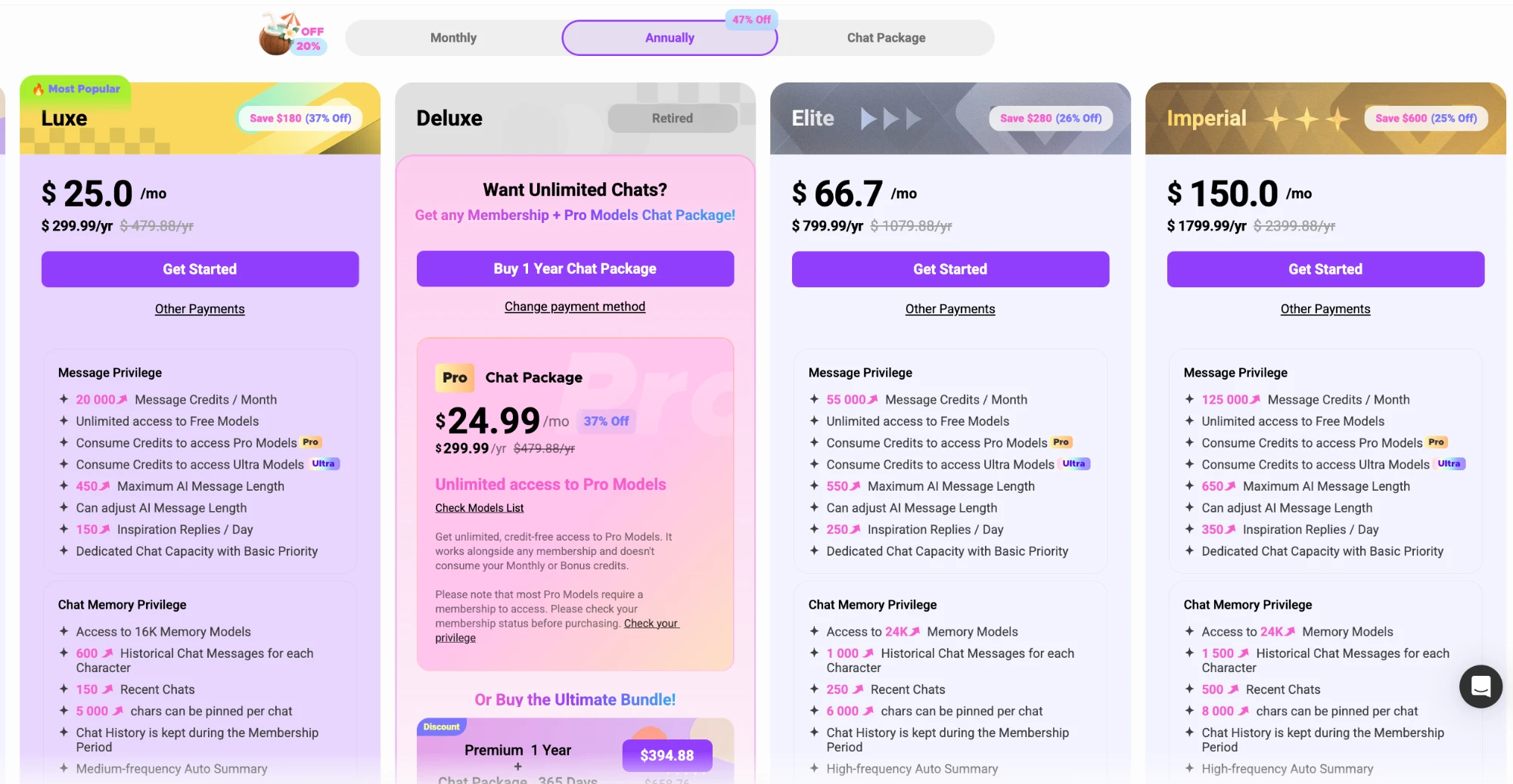
CrushOn AI offers a range of plans to fit different levels of usage, with each step up unlocking more message credits, longer chat memory, and additional features. You can choose between monthly or discounted yearly billing, with bigger savings at higher tiers. The table below shows current USD prices for each subscription option:
| Plan | Monthly Price | Yearly Price (per month) | Yearly Total |
|---|---|---|---|
| Free | $0 | $0 | $0 |
| Standard | $5.99 | $4.90 | $58.88 |
| Premium | $14.99 | $7.90 | $94.88 |
| Luxe | $39.99 | $25.00 | $299.99 |
| Elite | $89.99 | $66.70 | $799.99 |
| Imperial | $199.99 | $150.00 | $1,799.99 |
Pricing is shown in USD and can differ by region or change over time, so always check the official site for the most up-to-date rates.
Inside the paid plans
Upgrading to a paid CrushOn AI membership gets you more message credits, longer chat histories, and better access to advanced AI models. There are still a few extras you might choose to purchase depending on how you use the app:
- Extra message credits for Pro and Ultra models, beyond your plan’s monthly allowance
- The optional Pro Chat Pack for unlimited Pro model chats
- Bundles that combine yearly Premium or Luxe with the Chat Pack
- Additional custom voice slots and discounted PRO voice creations
- Higher-tier plans get longer AI messages, more profile cards, and extra chat features
Most users will find a paid plan covers regular chatting, but heavy users or those wanting unlimited Pro chats will want to consider add-ons.
How CrushOn AI credits work
CrushOn AI uses message credits as its internal currency, which you’ll spend when chatting with Pro and Ultra AI models. Each subscription tier comes with a monthly allowance—ranging from 100 for free users to 125,000 for Imperial subscribers. Free models are always unlimited, no matter which plan you pick, but if you want to unlock the more advanced Pro or Ultra models, you’ll use your monthly credits up to the cap. Once those are used, you’ll need to purchase extras or add the Pro Chat Pack for unlimited Pro access. This setup helps you control costs by matching your spending to your chat intensity.
Discreet billing
All subscriptions are billed to your selected payment method using a recurring card-style charge, designed for privacy. Exact wording on your bank statement may vary depending on your payment provider. Tip: For the most current info on discreet billing, check the checkout page for details before purchasing.
Renewal and cancellation
Subscriptions renew automatically to keep your access active, but you can cancel anytime. Here’s how to cancel CrushOn AI if you decide not to renew:
1. Log into your CrushOn AI account.
2. Go to your account or subscription settings.
3. Look for your current plan and select 'Manage' or 'Cancel Subscription.'
4. Follow the prompts to confirm your cancellation.
5. You’ll keep access for the rest of your paid period.
If you ever need help, you can also contact CrushOn AI’s support for guidance with cancellation.
Budgeting for CrushOn AI
If you’re a media-heavy user—chatting with advanced Pro or Ultra models, sending long messages, or exploring group chats—your costs will depend on your plan and any extras. Here’s a quick overview of how typical usage lines up with subscription options:
| Usage Scenario | Suggested Plan | Monthly Credit Allowance | Unlimited Pro Chats? |
|---|---|---|---|
| Occasional chats, mostly free | Free | 100 | No |
| Daily advanced chats | Premium or Luxe | 6,000–20,000 | With Chat Pack |
| Heavy Pro/Ultra, long sessions | Elite or Imperial | 55,000–125,000 | With Chat Pack |
| Unlimited Pro only | Any + Pro Chat Pack | Varies | Yes |
You can always start free and upgrade if you find yourself hitting your credit limit regularly.
FAQ
What payment methods does CrushOn AI accept?
CrushOn AI accepts credit and debit cards, with additional payment options available at checkout. You can review the complete list of supported methods when you choose your plan.
How do I cancel my CrushOn AI subscription?
You can cancel any time by logging into your account, going to your subscription settings, and following the prompts to end your plan. Access remains until your current period ends.
Can I get a refund?
Refunds are considered on request—contact the official support channel if you need to request one. Approval depends on their policies and the details of your situation.