CrushOn AI Pricing
CrushOn AI offers a free plan and several paid subscriptions, starting from $5.99/month, with features increasing at each tier. Watch out for auto-renewal—cancellations must be made before your next billing cycle to avoid extra charges.
Payment methods
CrushOn AI supports several payment options, with most plans billed automatically each period. Not all methods may renew automatically, so check your checkout screen for details.
| Payment Method | Auto-renewal |
|---|---|
| Credit card | Yes |
| Debit card | Yes |
| Other checkout options | Check at checkout |
Recurring billing means you need to keep a valid payment method on file. Some alternative methods might not support renewal, so double-check before confirming.
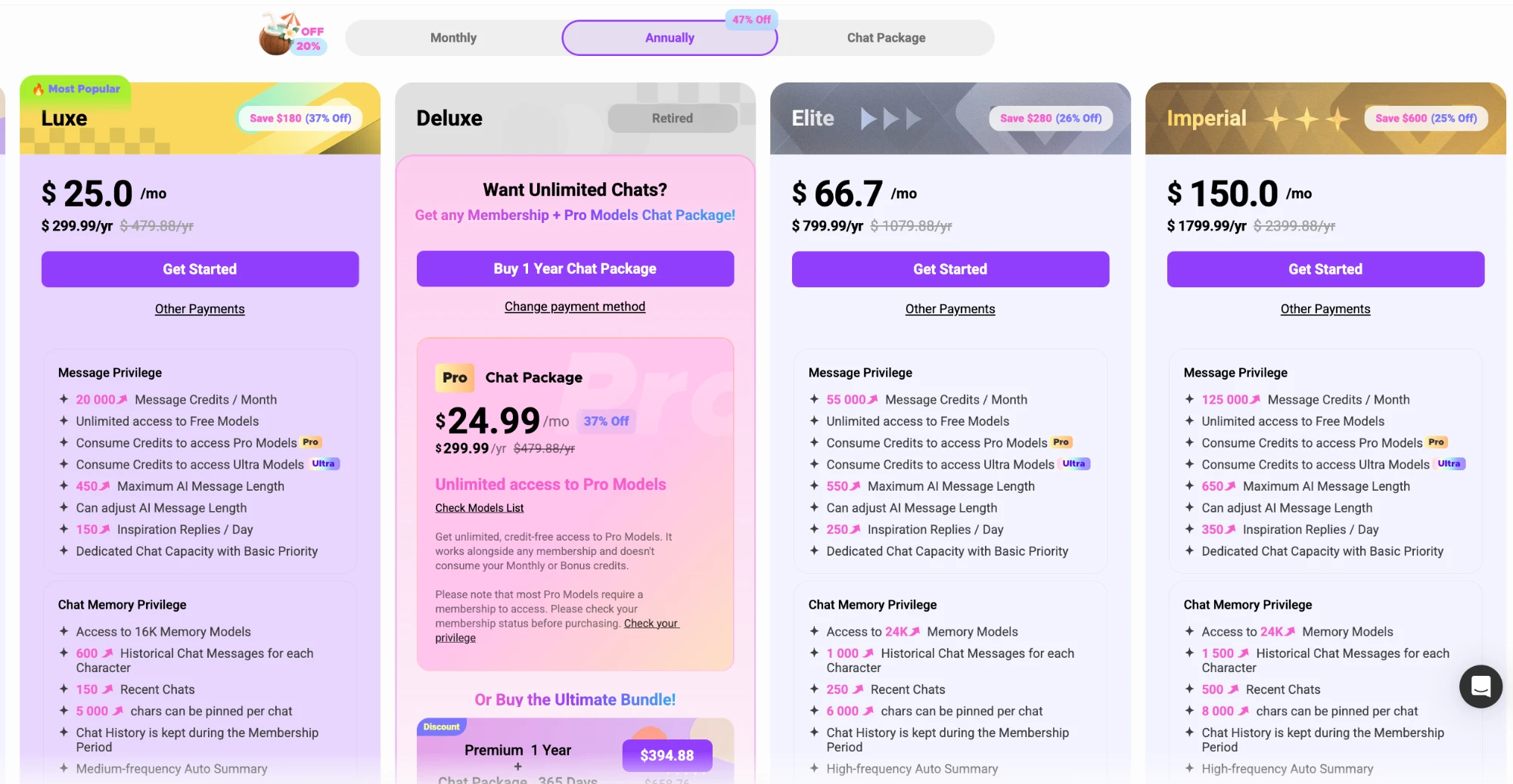
What each plan costs
CrushOn AI’s subscriptions range from Free up to high-tier options. Most plans offer a better deal if you pay yearly, but you’ll want to pick the tier that matches your usage.
| Plan | Monthly (USD) | Yearly (USD) |
|---|---|---|
| Free | $0 | $0 |
| Standard | $5.99 | $58.88 ($4.90/mo) |
| Premium | $14.99 | $94.88 ($7.90/mo) |
| Luxe | $39.99 | $299.99 ($25/mo) |
| Elite | $89.99 | $799.99 ($66.70/mo) |
| Imperial | $199.99 | $1,799.99 ($150/mo) |
Prices may vary by region and could change, so always check the official pricing page for the most up-to-date details.
What shows up on your bank statement
CrushOn AI uses recurring card-style billing for subscriptions. The exact merchant name or charge description isn’t specified, so check the checkout page for details if privacy is a concern.
Tip: If you want a discreet charge, always review the payment summary before confirming.
Renewal and cancellation
Subscriptions auto-renew unless you cancel. To avoid extra charges, follow these steps:
- Log in to your CrushOn AI account.
- Go to your account or subscription settings.
- Locate your current plan details.
- Click the cancellation option before your next billing date.
- Confirm the cancellation when prompted.
- Double-check for a confirmation email or message.
Your plan stays active until the end of the paid period, even after cancelling.
Refunds and disputes
Can I get a refund if I cancel?
Refunds aren’t automatic, but you can request one through the official support channel if needed.
How do I dispute a charge?
Contact support via your account or the site’s contact tools. They’ll review your request on a case-by-case basis.
Is anything non-refundable?
Always check the terms at checkout and ask support for specifics, as not all payments may be eligible.
Price verdict
CrushOn AI’s free tier gives you a solid taste of what’s on offer, but features like more message credits, longer memory, and advanced AI models are only available on paid plans. The annual subscriptions provide better value if you’re planning to stick around. While the higher tiers are a considerable investment, they offer significant perks for power users. Still, it’s smart to start free or on a lower plan to test what you really need.
FAQ
Can I get a refund?
Refunds are not automatic, but you can request one by contacting official CrushOn AI support. Each request is handled individually, so be sure to reach out if you have an issue.
Do prices differ by country?
Yes, CrushOn AI prices can vary depending on your region. Always check the pricing page at checkout to see the exact amount in your currency.
How do I cancel my CrushOn AI subscription?
You can cancel through your account’s subscription settings before your next billing date. Your access remains until the end of your current paid period.
What will the charge look like on my statement?
The exact statement description isn’t listed publicly—check the checkout page for details before you pay, especially if you want discretion.