CrushOn AI Subscription Plans
- Free to start, with a range of paid monthly and yearly plans.
- Subscriptions unlock higher message limits and more features for chatting with AI characters.
- Prices start at $5.99 USD/month and decrease for yearly billing, but can change by region.
How you can pay
CrushOn AI accepts several payment methods, helping you balance convenience and privacy. Your chosen method is billed automatically for ongoing access. Here’s a quick look:
| Payment Method | Privacy Level | Auto-Renewal |
|---|---|---|
| Credit/Debit Card | Standard | Yes |
| Other options (checkout) | Varies by provider | Most auto-renew |
Paying by card is straightforward, but your bank will see the transaction. Other payment options at checkout may offer more privacy, depending on the provider, but always check the renewal settings before completing your purchase.
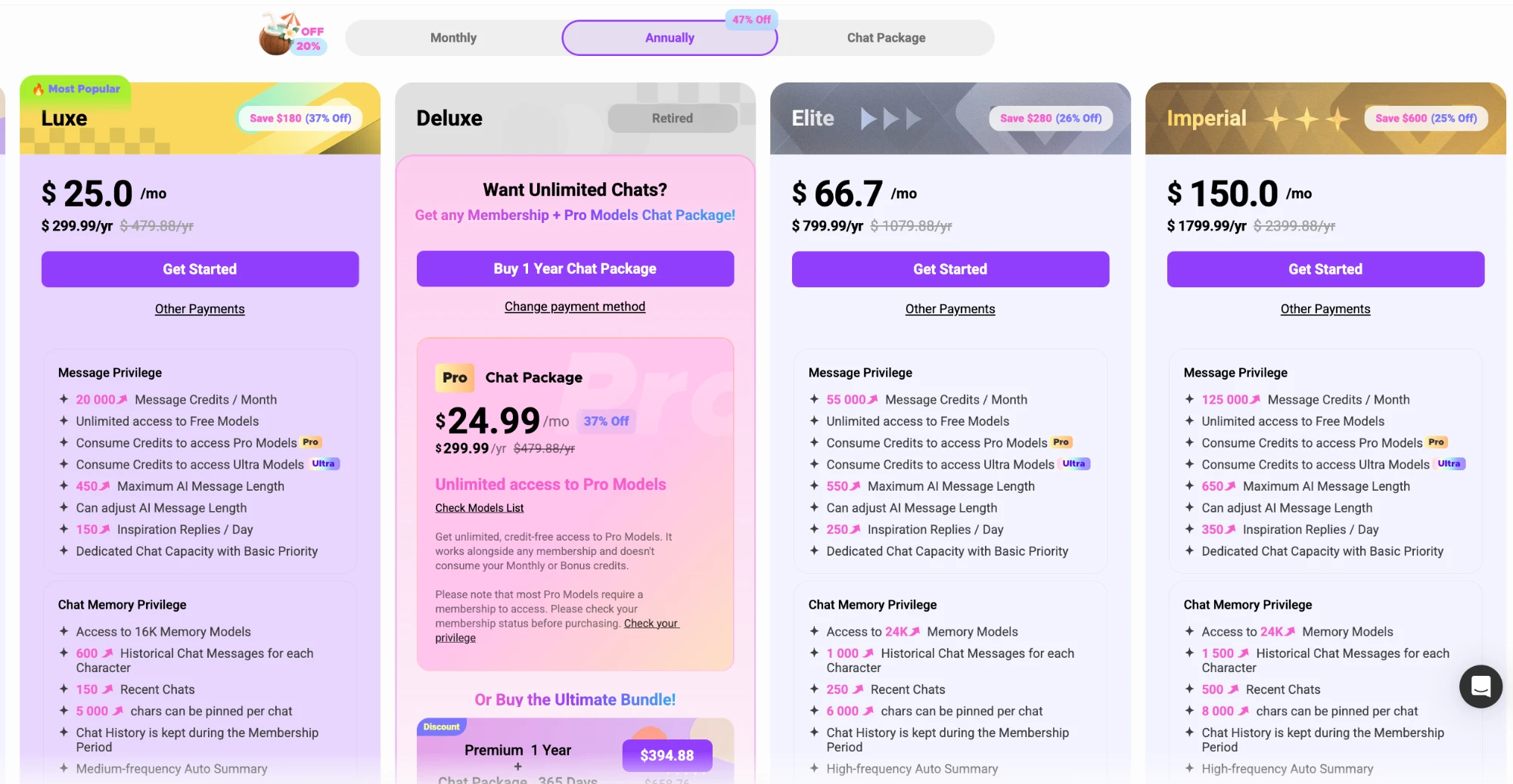
CrushOn AI pricing table
CrushOn AI offers a free tier, plus several paid plans with different monthly message credits, features, and pricing. Yearly billing gives a significant discount compared to paying monthly. Here’s the latest pricing we checked (in USD):
| Plan | Monthly | Yearly (per month) | Yearly (total) |
|---|---|---|---|
| Free | $0 | $0 | $0 |
| Standard | $5.99 | $4.90 | $58.88 |
| Premium | $14.99 | $7.90 | $94.88 |
| Luxe | $39.99 | $25.00 | $299.99 |
| Elite | $89.99 | $66.70 | $799.99 |
| Imperial | $199.99 | $150.00 | $1,799.99 |
Prices may vary by region and can change, so always check the latest details on the official site.
Cancel anytime?
You can cancel your CrushOn AI subscription to avoid future charges. Plans renew automatically unless cancelled in advance. The cancellation process is straightforward:
- Sign in to your CrushOn AI account.
- Go to your account or subscription settings.
- Locate your active subscription.
- Choose the cancellation option provided.
- Follow any confirmation steps shown.
- Check your email for a cancellation confirmation.
To avoid being billed for another period, cancel before your renewal date. Access stays active until the end of your current billing cycle.
Can you get your money back?
Are subscriptions refundable?
Refunds aren’t automatic. You’ll need to request one through the official support channel.
How do I request a refund?
Contact support via your account or the site’s contact options to explain your situation. They handle refund requests individually.
Where can I find full terms?
Check CrushOn AI’s official terms of service or help section for current refund policies.
Budgeting for CrushOn AI
If you’re a light user, it’s possible to keep costs low while still enjoying CrushOn AI’s features. Here are a few ways you might approach it:
- Use the free tier for up to 100 monthly credits and basic voice features.
- Step up to Standard only if you need more message credits.
- Consider yearly billing for bigger savings if you plan to stick around.
- Make the most of unlimited free-model chats on any plan.
- Only upgrade to Premium or above if you want extra chat memory or longer messages.
You can start at the free level and upgrade later if you outgrow the basic features.
FAQ
Is the yearly plan cheaper?
Yes, yearly plans lower the monthly cost compared to paying each month. For example, Luxe is $25 per month billed yearly ($299.99 total) instead of $39.99 per month.
How do I cancel my CrushOn AI subscription?
Log in, visit your account or subscription settings, and follow the cancellation steps there. Be sure to cancel before your renewal date to avoid being charged again.
What will the charge look like on my statement?
Charges appear under the payment processor or CrushOn AI's name. The exact description may depend on your payment method and region.